kawaiintu-os-neo-moebuntu
🌸 Kawaiintu OS (Neo Moebuntu)
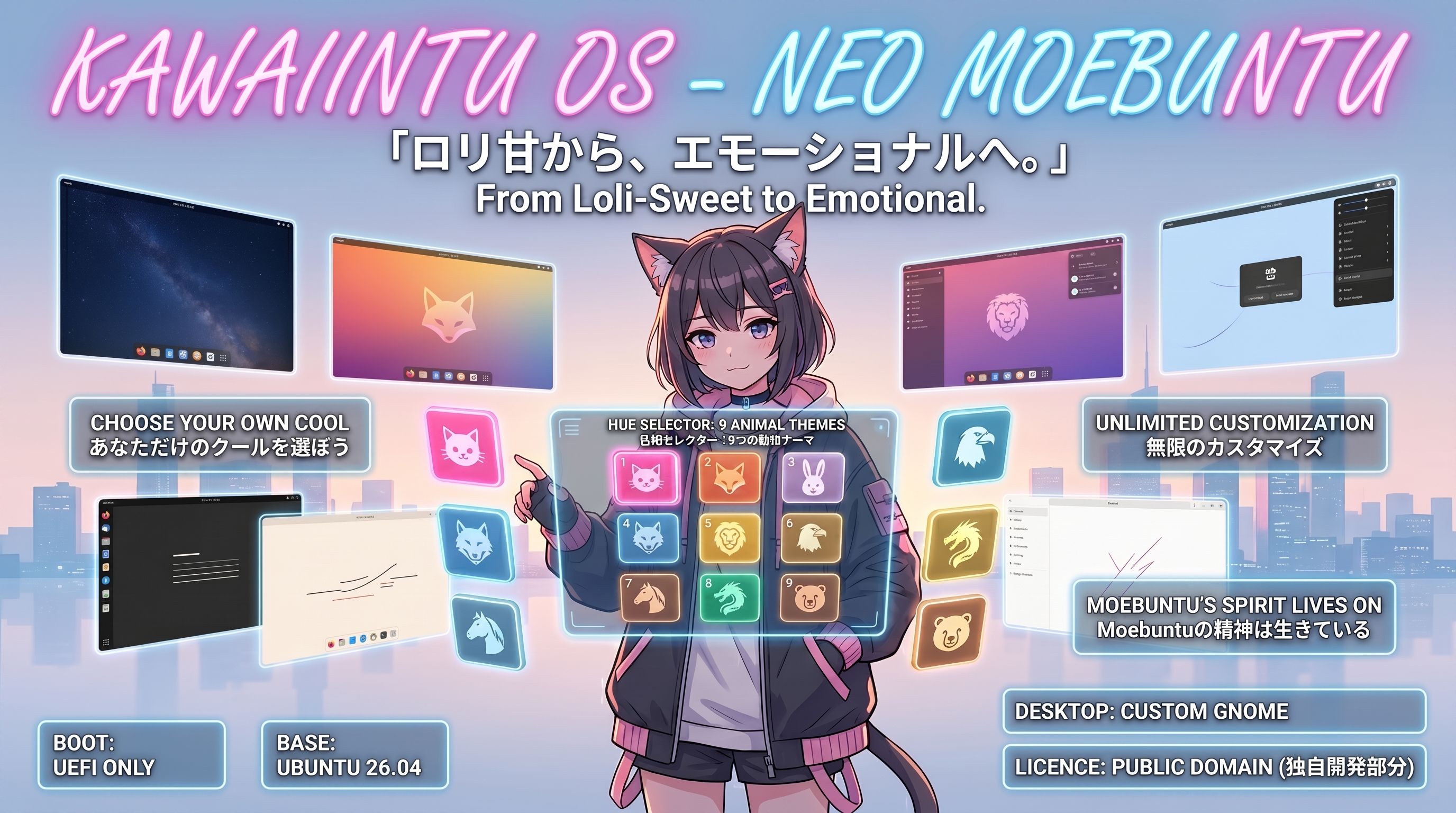
Kawaiintu UEFI MODE Distribution
「ロリ甘から、エモーショナルへ。」 (From Loli-Sweet to Emotional.)
A next-generation custom Ubuntu distro inheriting Moebuntu. Evolved into an “Emo & Cool” aesthetic with dynamic 9-color hue rotation. Moebuntuの系譜を継承しつつ、独自のPython色相回転ギミックにより、新たな「エモくてかっこいい」世界観へと進化した次世代カスタムOS。
🏆 Community Reception:
- 🔥 Trending on r/unixporn: Over 1.6K+ views!
- 💬 “More solid than Windows 11 Pro.” — a Reddit user
- 🗳️ Support Us on DistroWatch!: We are currently on the waiting list. If you like Kawaiintu, please Recommend us here! (DistroWatchにて審査待ちです。Kawaiintuを気に入っていただけたら、こちらのページ下部から「Recommend」への投票をお願いします!)
⚠️ Important Notice / 重要なお知らせ
Regarding Kawaiintu OS (Neo Moebuntu)
The concept and philosophical origins of this project respect the original Moebuntu by Mr. Toy. However, for any technical inquiries that Mr. Toy cannot answer—including the GTK4 Python dynamic color hooks, standalone theme architecture, and 2GB RAM footprint optimizations—I, the technical lead, will answer them.
Contact: mifjpn@gmail.com
Kawaiintu OS (Neo Moebuntu) について
本プロジェクトの思想的源流は、Toy氏のMoebuntuに最大限の敬意を払っています。 ただし、GTK4とPythonを用いた動的色相フック、スタンドアロンのTheme構造、および2GBメモリ環境でのシステム挙動など、Toy氏では回答不可能な「技術的仕様」に関するお問い合わせは、技術開発を担当した私宛にご連絡ください。
Contact: mifjpn@gmail.com
🔥 Try it Risk-Free in Live Mode! / Liveモードでノーリスクで試そう!
You don’t need to install anything to experience this. The ISO comes with a fully functional Live Environment. Just flash it to a USB drive, boot it up, and you can test the dynamic GTK4 hue-rotation, Python hooks, and custom system sounds directly on your hardware without touching your current OS! If you love it, you can install it via Calamares. If not, just unplug the USB!
(このOSを体験するのに、今のPC環境を壊す必要はありません。) ISOには完全動作するLive環境が含まれています。USBメモリに焼いて起動するだけで、現在のOSを一切イジることなく、動的なGTK4色相回転やPythonフックなどの全機能をあなたのPC上で直接テストできます!気に入ったらそのままインストールでき、違うなと思ったらUSBを抜くだけです!
✨ Features / 主な特徴








🎥 Real Hardware Tech Demo / 実機デモ動画
Check out how Kawaiintu runs on actual hardware! This quick over-the-shoulder demo showcases the custom Plymouth boot animation, the instant non-destructive theme switching via Python, and the Calamares installer. (実際のPC上でKawaiintuが動作している様子をご覧ください!カスタムPlymouth(起動画面)から始まり、Pythonフックによる一瞬のテーマ切り替えギミック、そしてインストーラーの起動までを確認できる実機デモです。)
👉 Watch the Tech Demo on YouTube
-
🎨 Non-Destructive UI Theming (GTK4 Bypass): We bypassed the strict GTK4/libadwaita theming limits safely. Our custom Python daemon dynamically hooks into UI selectors to rotate colors on the fly, crafting 9 distinct themes without breaking system CSS files. (独自のPythonデーモンにより、GTK4/libadwaitaの厳格なテーマ制限を非破壊で回避。システムファイルを壊すことなく、9色の美しい色相回転ギミックを実現しました。)
-
🐾 Animal Motifs: Each of the 9 color themes corresponds to a specific animal, adding a playful yet stylish touch to your desktop experience. (それぞれのテーマカラーには動物のモチーフが対応しており、遊び心とスタイリッシュさを両立。)
-
🌍 Borderless Experience (True Multilingual Support): Zero friction for global users. Powered by the highly acclaimed Calamares installer, Kawaiintu delivers a flawless, out-of-the-box multilingual experience. Set your native language, timezone, and precise keyboard layout effortlessly right from the initial setup screen. (国境を越えるOS体験を。世界中で高く評価されているCalamaresインストーラーの採用により、煩わしいロケール設定の壁を排除しました。インストール画面から母国語やキーボードレイアウトを選ぶだけで、あなたの言語環境に完全に最適化された状態で使い始められます。)
-
🕶️ Cool Login Screen: A sleek and highly polished login screen that sets an “emo and cool” mood right from the moment you boot up. (起動した瞬間から「エモくてかっこいい」世界観を演出する、クールなログイン画面。)
-
🛠️ Ultimate Freedom (True to Moebuntu’s Spirit): While it looks perfectly configured out of the box, you still have complete freedom to change the Plymouth (boot animation), Login screen, and Wallpapers to whatever you desire. (初期状態で完成されたデザインでありながら、Moebuntuと同様にPlymouth、ログイン画面、背景画像はユーザーの好みに合わせて自由に変更可能。着せ替えの自由度はそのままです。)
-
⚡ Modern Architecture: Optimized exclusively for UEFI boot mode. (UEFIモード専用に最適化されたモダンな環境。)
🛠️ Applying Themes via Scripts (For Existing Users & Developers) / スクリプトによるテーマ適用 (既存ユーザー&開発者向け)
Execute the bundled scripts in your terminal to automatically set up the GTK theme, GDM (Login Screen), and Plymouth (Boot Screen): (同梱のスクリプトをターミナルで実行することで、GTKテーマ、GDM(ログイン画面)、Plymouth(起動画面)を自動的にセットアップできます。)
💡 Geek Note: If you are a developer or a “ricer” from r/unixporn looking for the dynamic GTK4 Python hook, you can inspect the core logic deployed by these scripts here: 👉 Check out the Theme packages here (開発者やr/unixpornのギーク層向け:動的なGTK4 Pythonフックの仕組みを探している場合は、こちらのテーマパッケージ内に展開されているコアロジックを確認できます:👉 テーマパッケージを確認する)
-
◯
./install.shAutomatically deploys theme files to/usr/share/themes/and configures system-level components (GDM/Plymouth), including the essentialupdate-initramfsinitialization. (Requires sudo) (テーマファイルを/usr/share/themes/に自動配置し、必須となるupdate-initramfsの初期化を含め、システムレベルのコンポーネント(GDM/Plymouth)を設定します。※要sudo) -
◯
./bg_change.shA helper script to change the GDM login screen background to any image of your choice. Follow the on-screen terminal prompts. (GDMログイン画面の背景を好きな画像に変更するためのヘルパースクリプトです。ターミナルの画面指示に従ってください。) -
◯
./uninstall.shSafely restores your GDM, Plymouth, and system themes back to the default Ubuntu configuration. (GDM、Plymouth、およびシステムテーマを、安全にデフォルトのUbuntu設定に復元します。)
🖥️ System Requirements / 推奨動作環境
- RAM: 6GB+ Recommended (推奨)
- Storage: 40GB+ Recommended (推奨)
- Boot: UEFI Mode Only (必須)
💡 Performance Note: While we recommend 6GB for a comfortable daily experience, the OS is so heavily optimized that it can actually run GIMP smoothly on a constrained 2GB RAM setup! Check out the proof on YouTube: 👉 Watch the 2GB RAM Tech Demo (※快適な日常使いには6GB以上を推奨しますが、極限まで軽量化されているため、なんと2GBの環境でもGIMPが動作します!その証拠となる技術デモ動画はこちらからご覧いただけます。)
❓ FAQ (Frequently Asked Questions / よくある質問)
Q. Why distribute this as a full OS ISO instead of just a theme script? (なぜ単なるテーマスクリプトではなく、完全なOSのISOとして配布しているのですか?) A. Traditional GTK theming (like CSS overrides) often breaks the UI after system updates. To solve this, Kawaiintu uses a custom Python daemon that dynamically hooks into GTK4 selectors in-memory. Distributing it as a Live ISO allows users to safely experience this fail-safe architecture in a RAM sandbox without risking their main system’s stability. (従来のGTKテーマ変更(CSSの上書きなど)は、システムアップデート後にUIが壊れることがよくあります。これを解決するため、KawaiintuはカスタムPythonデーモンを使用し、インメモリでGTK4セレクタに動的にフックします。Live ISOとして配布することで、メインシステムの安定性を危険にさらすことなく、RAM上のサンドボックスでこのフェイルセーフなアーキテクチャを安全に体験できるようになります。)
Q. Is this safe to use? Are there any modified core files? (これは安全に使用できますか?改変されたコアファイルはありますか?) A. Yes, underneath the heavy anime aesthetic, it is purely a solid Ubuntu core. No core system files or security packages are modified or replaced. The custom theming is completely non-destructive and gracefully falls back to default libadwaita if disabled. (はい、派手なアニメテイストの見た目の裏側は、純粋で堅牢なUbuntuコアです。コアとなるシステムファイルやセキュリティパッケージは一切改変・置換されていません。カスタムテーマは完全に非破壊的であり、無効化された場合はデフォルトのlibadwaitaに安全にフォールバックします。)
🎥 For Tech Reviewers & Content Creators / レビュアー&クリエイターの方へ
Are you planning to review Kawaiintu OS or test the “AI fake” rumors? We welcome your deep dives! (Kawaiintu OSのレビューや、「AIフェイク」の噂の検証をご検討中ですか?大歓迎です!)
- Zero Risk Testing (ゼロリスク検証): You don’t need to risk your main rig. The dynamic GTK4 Python hooks and custom daemons work flawlessly on Live USB or Virtual Machines (Virt-Manager, GNOME Boxes, VMware). (メインPCを危険にさらす必要はありません。Live USBや仮想マシン上でも、動的なGTK4 Pythonフックやカスタムデーモンは完全に動作します。)
- Fully Verifiable (完全な検証可能性):
This is a real, functional OS, not a UI mock-up. You can inspect the actual Python code driving the UI bypass in the
/themesdirectory. (これは実働するOSであり、UIのモックアップではありません。UI制限をバイパスして動作する実際のPythonコードは、/themesディレクトリから直接確認できます。)
📥 Download / ダウンロード
You can download the latest ISO image from the Internet Archive link below. 最新のISOイメージは、以下のInternet Archiveリンクからダウンロード(直リンク/Torrent)できます。
👉 [Download Kawaiintu ISO (Internet Archive)]
(Note: We recommend using Torrent for faster and more stable downloads.) (※大容量ファイルのため、高速で安定したTorrent経由でのダウンロードを強く推奨します。)
💻 Live Mode & Installation / お試し&インストール方法 (ISO)
- Download the ISO file from the link above. (上記のリンクからISOファイルをダウンロードします。)
- Flash it to a USB drive using tools like Rufus or balenaEtcher. (RufusやbalenaEtcherなどのツールを使用して、USBメモリに書き込みます。)
- Boot your PC from the USB drive in UEFI mode. (PCをUEFIモードでUSBから起動します。)
- 🎉 Enjoy the Live Mode! Test the dynamic themes and experience the UI directly without making any changes to your PC. (Liveモードを満喫してください! PCの環境を一切変更することなく、そのままOSの全機能をテストできます。)
- Install (Optional): If you decide to keep it, launch the Calamares installer from the desktop to setup Kawaiintu. (気に入った場合は、デスクトップ上のCalamaresインストーラーを起動してインストールを完了してください。)
📜 License / ライセンス
独自開発部分:パブリックドメイン (Public Domain / CC0) このプロジェクトにおいて独自に作成・設定された部分(Pythonスクリプト、GTK設定、独自テーマなど)は、パブリックドメインとして公開されています。作者への許可やクレジット表記なしで、複製、改変、配布、商用利用が自由に可能です。 (The original configurations, Python scripts, and custom themes created for this project are dedicated to the public domain.)
ベースシステム:各オープンソースライセンスに準拠 ベースとなるUbuntuシステム、および同梱されている各種ソフトウェア(GNOME環境や各パッケージなど)の著作権は放棄されていません。これらはそれぞれの開発元が定める元のライセンス(GPLなど)に準拠します。 (The underlying Ubuntu system and included software packages retain their original licenses, such as GPL.)